Building a whole Tailwind app, not just this component?
You just browsed 39 Tailwind breadcrumbs. Untitled UI Pro unlocks 5,000+ components and sections and 250+ page examples for React, styled with Tailwind CSS v4. One licence is a one-time $349 with lifetime updates; teams start at $999.
The reference-grade trail: full schema.org BreadcrumbList Microdata inline in the markup so Google can render breadcrumb rich results, ARIA done correctly, and separators that stay out of the accessibility tree. The port's win is aria-[current=page]: — the current-page style keys off the attribute a screen reader already reads, so style and semantics cannot drift.
A trail that truncates itself in a narrow column with zero JavaScript: intermediate crumbs collapse behind an ellipsis, and the ellipsis expands them back. The port upgrades the interaction — the CSS original expanded on hover, which touch users cannot do; here a real checkbox holds the expanded state and has-checked: reads it, so tap, click and keyboard all work.
A trail whose entire skin flips light to dark from one block of custom properties, with no JavaScript and no class-toggling framework: a hidden checkbox flips the tokens through has-checked:, so every crumb, separator and hover tint recolours from the same five variables. The SaaS-dashboard treatment, frosted glass included.
The Shopify/Magento faceted trail: Home › Women › Shoes plus removable filter chips, each with its own remove button. The port's interesting move is has-hover: — the chip tints when its remove button is hovered, which the CSS version needed :has(button:hover) for and Tailwind expresses as a variant on the chip itself.
A frosted-glass breadcrumb pill floating over a colour field: heavy backdrop-blur and saturation, a light-catching gradient hairline, and a shimmer that sweeps across the bar on hover or keyboard focus. The premium floating-UI treatment, kept readable at AA and reachable from the keyboard.
The soft-UI treatment: crumbs extruded from a single-colour surface by two opposing shadows — one light source, one dark — and the current crumb pressed inward with the same pair inverted. Tailwind's shadow-[...] with token references makes the light/dark pair a single editable value instead of four scattered numbers.
Newsletter
Enjoying these demos? Get new ones by email.
A short email when a new collection ships. Unsubscribe any time.
A sticky docs header whose breadcrumb trail contracts as you scroll: padding, logo and type scale all shrink into a slim pinned bar. The shrink state is a data-shrunk attribute on the scroll container, so every contracting element reads it through group-data-shrunk: — and the whole animation-timeline alternative is documented as a two-utility swap.
Material's flat surface, type scale and state layers in utilities: an elevation-1 card, a masked chevron separator, a color-mix() hover layer, and an ink ripple that fires on :active from a radial-gradient pseudo-element — no ripple library, no JS.
The trail tilted onto an isometric plane: perspective on the stage, a rotateX/rotateZ plane, and crumbs extruded by a stack of six hairline shadows so each reads as a physical tile. Hover lifts a tile toward the viewer on the Z axis; motion-reduce: flattens the whole scene to 2D.
Power navigation: intermediate crumbs open a dropdown of sibling pages, built on native <details>/<summary> so it is keyboard-ready and script-free. The port reads the disclosure state with open: on the <details> and a direct-child arbitrary variant for the caret — never group-open:, which would match through nested disclosures.
An edge-to-edge banner where each hierarchy step is a full-height coloured block, segments meeting flush with a bevel hairline and a tonal ramp encoding depth. The current step right-fills and takes the accent. On narrow screens the row becomes a stack — one max-sm: run instead of a media query.
A trail whose accent is one custom property the user switches live from a swatch row — hover tint, current-page fill and every focus ring recolour from that single variable. Nine lines of JS persist the choice; the port adds aria-pressed so the selected swatch is announced, not just visible.
The interlocking-chevron trail: every crumb is a clip-path polygon with a notch cut from its leading edge and a point on its trailing edge, overlapped by a negative margin so the shapes mesh. First and last crumbs carry their own flat-edged polygons — three shapes, stated on the three elements that use them.
The space-saving convention: the first crumb is a house icon, with the word "Home" kept for screen readers by Tailwind's built-in sr-only. The port's whole argument is that the visually-hidden pattern — the thing developers most often get wrong by hand — is one correct utility here.
Newsletter
Enjoying these demos? Get new ones by email.
A short email when a new collection ships. Unsubscribe any time.
Outline-only capsules: each crumb is a hairline rounded border with no fill, hover washes in a faint tint and shifts the border toward the accent, and the current crumb becomes a solid accent pill. The understated treatment, and the port's cleanest one-to-one mapping — almost every declaration has a utility.
The inverse of the extruded soft-UI trail: the whole path sits in a channel carved into the surface, each crumb gets its own shallow well on hover, and the current crumb is the single raised node in the groove. One surface colour, three shadow recipes.
A trail laid out on a grid instead of a flex row: crumbs flow into as many max-content columns as fit, then stack into full-width rows below the breakpoint — each crumb a small card that lifts 1px on hover. The port turns one media query into a max-sm: run on four elements.
A deep-space glass pill with a holo-card iridescence: a conic rainbow rotates under a masked diagonal ruling, both fading in on hover or focus. This is the collection's clearest example of the port's limit — @property and @keyframes cannot be utilities, so the animation stays CSS and the markup keeps only what it can hold.
The marketing-site trail: crumb labels painted with a slowly drifting conic gradient clipped to the text, on a frosted white bar. Hover speeds the drift and draws a gradient rule under the label. bg-clip-text text-transparent is a real Tailwind pair, so only the angle registration and keyframes stay CSS.
The travel-marketplace bar: a category path on the left, a row of icon-bearing removable filter chips on the right, all inside one pill that becomes a stacked card in a narrow container. Chips lift on hover and their × turns accent — group-hover: doing the work of three descendant rules.
Warm paper, italic serif crumbs, and a signature flourish: an inline SVG wave draws itself under each crumb on hover or focus by tweening stroke-dashoffset. Tailwind has no dash utilities, so the port keeps two arbitrary properties on the path and everything else moves inline.
The terminal-flavoured docs trail: monospace crumbs, slash separators, and a copy button that puts the whole path on the clipboard for pasting into a PR or a ticket. The copied state is a data-copied attribute, so the icon swap and the button's own recolour both read it through variants.
Newsletter
Enjoying these demos? Get new ones by email.
A short email when a new collection ships. Unsubscribe any time.
The interlocking-arrow bar with a tunable point: one --tbc23-depth property drives every polygon and every overlap, so the chevron angle is a one-line edit across a five-step trail. The list carries a drop-shadow filter, which is the only way to shadow a clipped shape.
A trail whose icon, label and separator stay in perfect vertical alignment even when it wraps over several lines — each crumb inherits the parent's column tracks with subgrid. The port keeps both track declarations arbitrary, because a track list is not a design-scale value.
A dark minimal trail where each link grows a glowing underline that wipes in from the left and retracts to the right — one pseudo-element, a transform-origin flip, and a drop-shadow for the glow. Entirely compositor-driven, and the current crumb keeps its underline lit.
The cleanest trail in the collection: plain text links divided by a masked SVG chevron that inherits the crumb's colour, so switching the divider — slash, dot, chevron, anything — is a one-property edit. Everything else is four utilities.
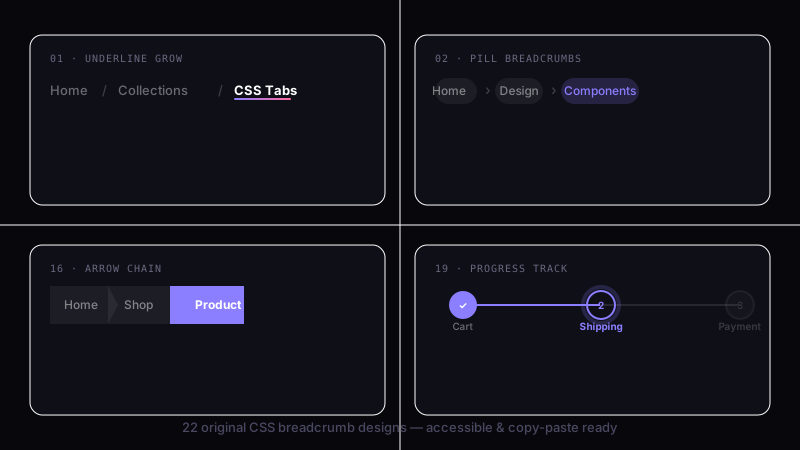
Breadcrumbs as a checkout progress bar: auto-numbered circular badges, connector lines that fill for completed steps, and three states read straight off a data-state attribute with data-[state=done]: variants. The numbering stays a CSS counter — the one thing utilities genuinely cannot do.
The paper-ribbon banner: warm overlapping chevrons with a shadowed crease where each segment folds behind the next. The fold is one directional inset shadow, and the stacking order is four z- utilities — the part the CSS version needed four nth-child rules for.
The friendly dashboard trail: every crumb is a softly tinted capsule, hover deepens the tint, and the current crumb is a solid accent pill. Two color-mix() values do all the work, both derived from one accent token, so the whole bar retints from a single edit.
The quietest trail in the set: crumbs divided by thin vertical hairlines with generous whitespace, muted low-profile type, and an underline that only appears on hover. Nine declarations become nine utilities — the port that proves not every pattern needs an arbitrary value.
A vivid gradient bar with a matching bloom beneath it: the glow is a blurred duplicate of the same gradient on a before: layer, and the current crumb's label is painted with a clipped white-to-lilac gradient. Bold, and the glow is one utility run rather than a second element.
Each crumb is an elevated white card linked by faint dotted connectors, lifting on hover and resting at top elevation when current. Three elevation levels as three arbitrary shadow pairs, and the connector is a dotted border on a pseudo-element.
A single-line trail engineered for tight widths: ancestors cap at 12ch and truncate with an ellipsis, the current page never shrinks, and the bar never wraps or overflows. Priority is expressed as shrink / shrink-0 rather than as media queries.
The classic article-header trail: serif text links divided by small centred bullets, with an italic current page. Two utilities carry the whole separator, and the port's only real change is that the bullet now belongs to the crumb that follows it.
Angular parallelogram segments for sports, gaming and automotive UIs: each crumb is skewed −20° and its label counter-skewed back so the type stays upright. Both transforms are real Tailwind utilities, which makes the pairing obvious instead of clever.
Line-art chevrons with no fills: each crumb is an outline drawn as an inset ring inside a clipped shape, hover washes in a faint tint, and the current crumb inverts to solid. The blueprint aesthetic for developer tools and design-system docs.
Stepper meets breadcrumb: every crumb leads with a circular badge holding an icon or an auto-incremented number, joined by short connector rules. The counter stays in CSS (it must), while the badge states, the connectors and the responsive icon-only mode are all utilities.
The dark counterpart to the glassmorphism pill: a translucent charcoal panel over a moody gradient, with a lit top edge, a darkened bottom edge, and cool accent links. Asymmetric border colours do the lighting, which is the detail that separates dark glass from a grey box.
Three tiny motions stacked on one hover: the crumb lifts 2px, a soft shadow fades in beneath it, and — the detail that sells it — the following separator nudges forward. has-hover: turns the CSS version's relational selector into a variant on the crumb that owns the chevron.
FAQ
Frequently asked questions
How do I make these Tailwind breadcrumbs accessible to screen readers?
Wrap the trail in a <nav> with aria-label="Breadcrumb" and put the crumbs in an ordered <ol> so assistive tech announces position and length. Mark the final crumb — the page you're on — with aria-current="page" and render it as plain text, not a link, since linking a page to itself is noise for keyboard and screen-reader users. Every demo here follows that structure. For the icon-only home node in Demo 14, keep the word Home in the DOM inside an sr-only span so the icon still has an accessible name; a bare house glyph reads as nothing. Decorative chevrons and slashes should never be announced — the masked-SVG and clip-path separators are pure CSS, so they're already invisible to the accessibility tree, but if you use a text separator put it in an element with aria-hidden="true".
How do I add schema.org BreadcrumbList structured data like Demo 01?
Demo 01 nests the vocabulary directly in the markup: the <ol> carries itemscope and itemtype="https://schema.org/BreadcrumbList", each <li> is an itemprop="itemListElement" with its own itemscope and ListItem type, the link is itemprop="item", its label is itemprop="name", and a <meta> tag supplies itemprop="position" as an integer starting at 1. The most common mistake is skipping the position meta or numbering from 0 — crawlers then drop the trail from the rich result. The last crumb still needs a position value even though it isn't a link. Keep the visible order and the integers in sync; if you reorder crumbs, renumber. You don't need JSON-LD as well — inline Microdata plus a script block describing the same trail would just be redundant.
How does the interlocking arrow breadcrumb built with clip-path actually work?
Demos 13, 23 and 36 shape each crumb with clip-path: a polygon that cuts a notch into the left edge and pushes a point out the right, so consecutive crumbs interlock like a ribbon. To make them overlap seamlessly, give every crumb a negative left margin roughly equal to the arrow depth and add left padding so the label clears the notch. Demo 23 exposes the point size as one custom property, --tbc23-depth, so you tune every polygon from a single value instead of editing each clip. The usual bug is the last crumb keeping its outgoing point when it should end flush — target it and swap the polygon to a plain rectangle. The second is text sitting under the notch on the first crumb, which has no incoming cut, so reset its left padding. Clipped shapes can't cast a real box-shadow, which is why Demo 36 fakes its outline with an inset ring instead.
How do I stop a long breadcrumb from overflowing on mobile without JavaScript?
Two demos solve narrow widths without a line of script. Demo 02 uses container queries: the breadcrumb reads its own container width, and below a threshold the intermediate crumbs collapse behind an ellipsis while the first and last stay visible — the trail never overflows its column even when the viewport is wide. Demo 33 takes the truncation route instead: ancestor labels cap at 12ch with overflow: hidden, white-space: nowrap and text-overflow: ellipsis, while the current page keeps its full text. Reach for container queries when the breadcrumb lives in a resizable panel or sidebar whose width doesn't track the viewport; reach for per-crumb truncation when you just need one line to survive on a phone. Don't clamp the current crumb — the page you're on is the one label users most need to read in full.
How do the light and dark mode breadcrumbs flip themes without JavaScript?
Demo 03 drives the entire skin from a block of custom properties — surface, text, link, hover and current-crumb colours are all variables, and a single prefers-color-scheme block, or a dark class, rewrites them, so light-to-dark is one cascade with no per-element overrides and no flash. Demo 38 is the dark-native version and Demo 12 lets the user pick the accent live from a swatch row and persists the choice. The key is that every colour, including separators, is a token: a masked-SVG chevron that inherits currentColor flips for free, but a chevron hard-coded to a hex value stays light on a dark bar — that's the most common theming bug here. If you persist a user choice, apply it before first paint with an inline snippet in the <head>, or the bar renders in the default theme for one frame and then jumps.
How do the breadcrumb dropdown sibling menus in Demo 10 work, and what breaks them?
Demo 10 turns intermediate crumbs into sibling-page menus using native <details> and <summary> — no JavaScript, no focus-trap code, and the disclosure state is handled by the browser. The <summary> is the crumb label; the panel is an absolutely positioned list beneath it. Because it's a real disclosure widget it's keyboard-operable out of the box: Enter or Space toggles it. The gotcha is that Escape does not close <details> — if you need Escape-to-close you must add a small handler, otherwise rely on click-outside. Set the parent to relative so the panel doesn't shift the row, and give it a high enough stacking context that it isn't clipped by an ancestor with overflow: hidden — a breadcrumb bar that hides overflow for truncation will swallow the menu. Each summary is independent, so several can be open at once by design.
How do the masked SVG separators re-colour themselves on hover and in dark mode?
Demo 26 and Demo 08 draw the chevron with mask-image instead of an inline SVG or a text glyph: a small SVG data URL masks a box whose background is currentColor, so the separator is the same colour as the crumb text and re-tints automatically on hover or in dark mode. That's why it costs nothing to theme — there's no fill attribute to chase. It's also invisible to screen readers because it carries no text. The common mistake is setting background to a fixed colour instead of currentColor, which breaks the inherit; the second is forgetting mask-size and mask-repeat: no-repeat, so the shape tiles or stretches. To swap the chevron for a slash or a dot you change only the data URL — the sizing and colour logic stays. Keep the mask box a fixed width with flex-shrink: 0 so it never collapses when the row is tight.
When should I not use a breadcrumb, and which of these demos are the wrong tool?
Don't reach for a breadcrumb when what you actually have is linear progress. Demos 27 and 37 look like breadcrumbs — numbered circular badges, connector lines — but they represent a checkout wizard and a stepper, which are a different pattern: the steps are a sequence you move through, not a hierarchy of ancestor pages. Mark those with an ordered list and aria-current="step", not aria-current="page", and don't wrap them in a <nav> labelled Breadcrumb. Likewise, skip a breadcrumb on a flat site only one or two levels deep — a trail of Home to Page adds chrome and no orientation. The decorative variants — skewed parallelograms in Demo 35, isometric tiles in Demo 09, holographic shimmer in Demo 18 — suit marketing or themed UIs; in a dense admin table a quiet line-separator trail like Demo 30 reads faster and competes less with the content.