17 Pure CSS3 Light JSPublished 8 new designs · Updated on
A scroll-driven animation binds progress to scroll position rather than a clock — scroll halfway and it is halfway, scroll back and it reverses. These 20 hand-coded patterns cover animation-timeline with scroll() and view(), named timelines, the four view ranges, sticky scrubbing, and the IntersectionObserver fallback. Every demo renders its finished state without scroll timelines, so nothing is blank in Safari. Scoped under .sa-NN; drops into React, Vue, Svelte, or Astro.
Want to build production-ready CSS layouts, animations and UI from scratch?
You just browsed 20 scroll animations. Learn the Flexbox, Grid and animation thinking behind them, so the next component starts in your head, not in a copy-paste.
Safari has not shipped scroll-driven animations, so anything scroll-bound needs a plan for it — and the honest plan is IntersectionObserver, which triggers rather than scrubs. This demo runs both paths side by side and states the contract plainly: the fallback is a different behaviour, so design it as an intentional one.
The two IntersectionObserver options that most people set by trial and error. rootMargin grows or shrinks the detection box in CSS-length syntax, negatives included; threshold decides how much of the subject must be visible to fire, and an array fires at several points. A live dial reports the current ratio and which threshold last fired.
Scroll snapping and scroll timelines work together, but snapping changes the shape of the progress signal: instead of sweeping, it lands. An animation tuned for smooth scrolling reads as a stutter once snapped. Two identical scrollers — one snapping, one free — plus the adjustment that makes the snapped one read correctly.
Binding stroke-dashoffset to a scroll timeline draws a path as the reader descends. Two details make it predictable: pathLength normalisation, so the numbers do not depend on the real geometry, and stroke-dasharray, without which dashoffset has nothing to offset and the animation appears not to run at all.
Scroll-bound motion is among the strongest vestibular triggers, because it tracks a movement the user did not ask for. The usual blanket animation: none is wrong here for a specific reason: it can strand elements at their range-start state, invisible or misplaced. The correct order is end state first, binding second.
The practical argument for CSS scroll timelines over a scroll listener: the CSS path runs off the main thread, so it stays smooth while JavaScript is busy. Two indicators, one bound in CSS and one driven by a scroll event, with a button that blocks the main thread on purpose — so the difference is visible rather than asserted.
Newsletter
Enjoying these demos? Get new ones by email.
A short email when a new collection ships. Unsubscribe any time.
How to ship a scroll animation while a major engine has not implemented it: make the static layout complete and correct on its own, then layer motion on top inside @supports (animation-timeline: scroll()). The ordering rule is the whole lesson — the base must be the finished state, never the start state.
Scroll timelines fail silently: no error, no warning, nothing moves. This is the closing reference — five toggles, each introducing one of the five real causes, with the symptom named beside it. Flip one at a time and learn to recognise each failure by sight rather than by guessing.
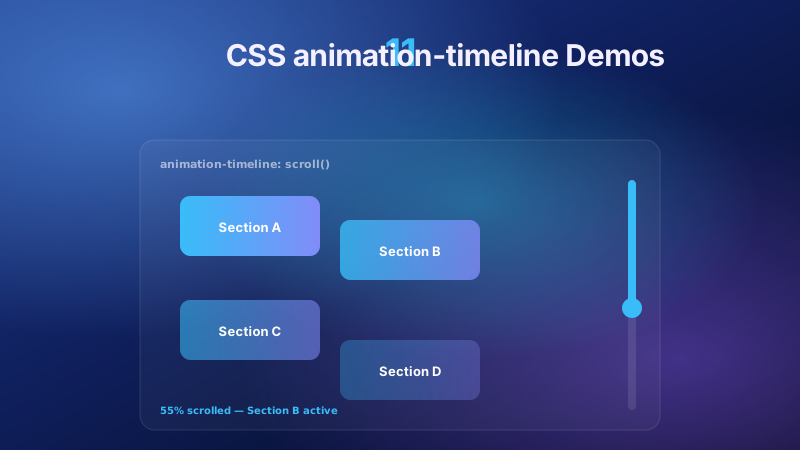
The reference build for the whole collection. One indicator is bound with animation-timeline: scroll(), every part of the scroll() function is named beside it, and a live percentage readout proves the progress is the scroll offset itself rather than a timer. Start here before any other demo, then read the rule that catches everyone: animation-duration is ignored.
An anonymous scroll() resolves to whichever scroll container happens to be nearest. A named timeline is explicit instead: the scroller publishes its progress as scroll-timeline-name: --sa-10-feed and any descendant consumes it with animation-timeline: --sa-10-feed. Two elements in different branches of the tree, driven by one binding.
scroll() tracks the scroller's total offset; view() tracks one element's own passage through that scroller. The difference is the source of most "why does it animate at the wrong time" confusion, so this demo runs both bindings side by side with the subject and the scroller labelled on each.
By default an animation spans its entire timeline. animation-range-start and animation-range-end cut it down to a slice, taking range names, percentages, lengths, or a name and an offset together. Three identical layers run on one timeline with three different ranges, each range printed beside the layer it controls.
Scroll timelines are not vertical by default so much as block by default. Switching to scroll(inline) or scroll-timeline-axis: inline binds progress to horizontal scrolling instead, which is what a filmstrip, a card rail or a table with frozen columns needs. The indicator here tracks inline progress across a nine-frame rail.
A view timeline exposes four named ranges and choosing the wrong one is the most common reason a scroll-bound animation feels mistimed. Four identical cards, one per range, each labelled with exactly when it starts and ends — a reference card you can scroll rather than a spec paragraph you have to hold in your head.
Newsletter
Enjoying these demos? Get new ones by email.
A short email when a new collection ships. Unsubscribe any time.
A named timeline is visible only to descendants of the element that declares it, which fails the moment your sticky header is a sibling of the content column rather than inside it. timeline-scope on a common ancestor lifts that visibility so a sibling branch can subscribe — and it is the least-supported property in this collection, so it ships behind a gate.
A scroll timeline needs a scroll container, and an element only becomes one through overflow: scroll or auto. Bind to a panel that never scrolls and there is no error, no warning, and no motion. Two panels here differ by exactly one declaration — one works, one is dead — and both are labelled.
Pin a scene with position: sticky inside a much taller parent and bind an animation to that parent's scroll: the scene holds still on screen while its contents scrub. This is the mechanism behind step-through product tours, and it depends entirely on the sticky element having somewhere to travel.
Two rules that trip up everyone. animation-duration is ignored on a scroll timeline, because the progress is the scroll offset and there is no time to spend. animation-fill-mode matters more than usual, because it decides what an element looks like outside its range — and here all four values sit side by side at the same offset.
Binding rotateX and translateZ to a view timeline gives a card that turns as it arrives — but only if the two properties that make 3D work are on the right elements. perspective belongs to the parent, transform-style: preserve-3d to the transformed element, and getting either wrong flattens the whole scene.
Five elements, one named timeline, five different ranges. The apparent depth comes entirely from range divergence — no extra timelines, no per-element scrollers, no duplicated bindings. The lesson is that ranges, not timelines, are the unit you reach for when several things should move at different rates.
FAQ
Frequently asked questions
What is the difference between a scroll-driven and a scroll-triggered animation?
The distinction matters because almost every library conflates them. A scroll-driven animation has its progress bound to a scroll offset: scroll halfway through the range and the animation is exactly halfway, scroll back and it plays backward. It is a timeline, declared with animation-timeline, scroll-timeline-name, view-timeline-name and animation-range, and it has no clock of its own. A scroll-triggered animation fires once when an element crosses a threshold and then runs on its own duration regardless of what the scroll does next — that is an entrance animation that happens to be started by scroll. Both are useful and they solve different problems: use a timeline when the motion should track the user's scroll position, and a trigger when you want a one-shot reveal. This collection covers the timeline mechanism; one-shot entrance effects live in the fade-in and slide-in collections.
Do scroll-driven animations work in Safari?
Not yet — Safari has not shipped animation-timeline, and Firefox required the layout.css.scroll-driven-animations flag until version 136. That is the single most important fact about this feature and it shapes how every demo here is written. The rule is that the base layout must declare the FINISHED state, with the scroll binding layered on top inside an @supports (animation-timeline: scroll()) block. Get that ordering backwards — base style sets opacity: 0 and the @supports block animates it in — and browsers without support show content that never arrives, which is a blank page rather than a missing flourish. Every demo in this collection was verified by stripping its timeline-gated @supports blocks and confirming the demo still renders complete and readable. Demo 07 teaches the gating pattern directly, and demo 01 covers the IntersectionObserver fallback for when you need the motion in Safari too.
Why is my scroll timeline not doing anything?
Scroll timelines fail silently — no console error, no warning, nothing moves — so the debugging is all checklist work. Five causes account for nearly every case. The element you bound to is not actually a scroll container: it only becomes one with overflow: scroll or auto plus content taller than its box, and binding to a div that never scrolls produces no error at all. An ancestor has overflow: hidden, which kills the scroll container you were counting on. The animated element is not a descendant of the element that defines the named timeline, so the name simply does not resolve — that is what timeline-scope exists to fix. The range resolves to zero length, so there is no progress to interpolate across. Or the property you are animating is not animatable in the first place. Demo 08 walks all five as toggleable broken states with the symptom labelled beside each.
What do cover, contain, entry and exit actually mean?
They are the four named ranges of a view timeline, and they are the most confusing part of the specification because the names sound similar and the differences only show up at the edges. cover spans the entire time the subject overlaps the scrollport at all — from the moment its leading edge appears to the moment its trailing edge leaves. contain spans only the period when the subject is fully inside the scrollport, which means it is empty for a subject taller than the viewport. entry covers just the arrival, from first appearance to fully visible. exit covers just the departure. The practical rule: reach for entry when you want something to animate as it arrives, cover when you want motion across the whole visible pass, and be careful with contain on tall elements. Demo 14 puts four identical cards side by side, one per range, each labelled with when it starts and ends.
Why does animation-duration do nothing on a scroll timeline?
Because the scroll position IS the progress. On a normal time-based animation the duration says how long to take; on a scroll timeline there is no clock to take time from, so the declaration is ignored entirely — which sends people in circles when the motion feels wrong and adjusting duration changes nothing. What controls the extent of the motion is animation-range-start and animation-range-end, which decide which slice of the timeline the animation spans. What still matters is animation-fill-mode: it controls how the element renders outside the active range, and both is usually what you want so the element holds its start state before the range and its end state after. Demo 18 shows all four fill modes on identical elements sitting outside their range, which is the only place the difference is visible.
How do I transition an element based on its own position rather than page scroll?
That is exactly what view() is for, and the distinction from scroll() is worth getting right because mixing them up causes most of the "it animates at the wrong time" confusion. scroll() binds progress to the scroller's total offset, so an element animates according to how far the page has scrolled overall. view() binds progress to the subject's own passage through the scrollport, so the animation tracks that specific element regardless of where it sits in the document. Two roles are in play and they are easy to conflate: the subject is the element being tracked, and the scroller is the thing it moves through. Demo 11 shows one element bound each way, side by side and labelled, which makes the difference obvious in a way prose does not.
Are scroll animations bad for performance?
CSS scroll timelines are considerably better than the scroll-event listener they replace, and that is the strongest practical argument for using them. A scroll listener runs on the main thread, so it competes with rendering, hydration and any other JavaScript — under load the motion visibly stutters. A CSS scroll timeline animating transform or opacity runs on the compositor and stays smooth while the main thread is busy. Demo 06 makes this visible by putting both approaches side by side with a deliberate main-thread block, so the difference is demonstrated rather than asserted. The caveat is the same as for any animation: stay on transform and opacity. Binding width, height or top to scroll re-runs layout on every frame and gives back everything you gained.
How should scroll animations handle prefers-reduced-motion?
Scroll-bound motion is among the strongest vestibular triggers, because the movement tracks the user's own scrolling and is not something they chose to start. But the blanket fix everyone reaches for — a universal selector setting animation: none under the reduced-motion query — is wrong here for a specific reason: it can leave elements stranded at their range-start state, which for a typical reveal means invisible or offset, so the user gets a broken page rather than a calm one. The strategy that holds up is to make the finished state the default and layer the scroll binding on only when motion is allowed, so removing the animation removes movement without removing content. Demo 05 puts a component under all three treatments — blanket kill, no handling, and the layered approach — so the failure mode of the common advice is visible.
How is this different from the parallax and image-reveal collections?
Several collections sit adjacent here and each owns a distinct thing. This one covers the scroll timeline mechanism itself: how progress is bound, which subject and which scroller, what range it covers, and what to do where the feature has not shipped. css-parallax-designs (22 demos) owns parallax as a visual genre — depth layers, landscapes, mouse tracking, pinned scenes — where the look is the subject and the binding is plumbing. css-image-reveal-scroll (12 demos) owns image reveals, wipes and masks. css-scroll-progress-bar (18 demos) owns the progress bar as a component: styling, placement and variants. css-slide-in-animation and css-fade-in-animation own one-shot scroll-triggered entrances. If you are asking which range to use or why your timeline will not resolve, you are in the right place; if you want a finished parallax scene, the parallax collection is the better starting point.