30 Tailwind CSS hover effects for editorial links and navigation, marketing CTAs and add-to-cart buttons, product and profile cards, and image galleries — spanning underline draws, glitch and neon text, magnetic liquid and 3D-press buttons, tilt and flip cards, zoom-pan and duotone images, and cursor-trail motion. Scoped under .thv-NN for no-collision pasting, prefers-reduced-motion guarded, framework-agnostic.
Building a whole Tailwind app, not just this component?
You just browsed 30 Tailwind hover effects. Untitled UI Pro unlocks 5,000+ components and sections and 250+ page examples for React, styled with Tailwind CSS v4. One licence is a one-time $349 with lifetime updates; teams start at $999.
Six link underline hovers in utilities — left-to-right draw, centre expand, two-tone dual line, highlighter bar, dotted grow and a gradient background-size sweep. The port's win is that the resting transform and the hover transform sit side by side in one class list, so the pair cannot drift apart.
Four glitch hovers — RGB channel split, scanline flicker, noise slice and VHS chromatic aberration. Keyframes stay in the stylesheet (they are motion definitions, not design-scale values), but each becomes an --animate-* token, so firing one is a single hover:before:animate-* utility.
Five typographic hovers driven by tracking alone — expand, collapse-in, per-letter stagger, weight-plus-tracking and tracking-plus-glow. Tailwind's tracking-* scale covers the resting values; the wide hover targets are arbitrary, which is the correct split.
Six ways to paint a gradient onto letterforms on hover — position wipe, radial burst, rainbow shift, shimmer keyframe, duotone hue swap and a diagonal sweep. bg-clip-text and text-transparent are first-class utilities, which makes this the port that shrinks the most.
Four hovers that cut a word in half and push the pieces apart — top/bottom, left/right, a diagonal polygon and a split-plus-fade. Two clipped copies of the text live in before: and after:; the base element goes transparent so nothing shows through the seam.
Six electroluminescent text hovers — classic tube, flicker, hue cycle, multi-layer bloom, retro arcade and icy frost. Stacked text-shadow has no utility form and gets none here; what the port gains is that the dim resting glow and the lit hover glow are adjacent, so the pair is edited together.
Newsletter
Enjoying these demos? Get new ones by email.
A short email when a new collection ships. Unsubscribe any time.
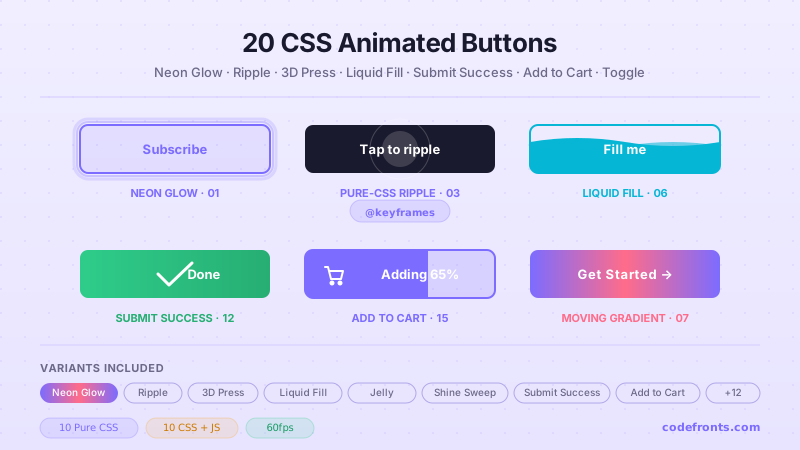
Four tactile button hovers — liquid fill, blob morph, surface-tension droplet and rubber squash-and-stretch. Fill layers are before: pseudo-elements scaled from zero; the label rides above on relative z-10.
Six border-draw hovers — clockwise stroke, corner brackets, double rail, dashed grow, a spinning conic ring and an inset box-shadow flood. The conic ring animates a registered --angle rather than rotating the element, which is what keeps a wide rectangle from flailing.
Five reflective button surfaces — diagonal gloss, radial spotlight, frosted double edge, holographic foil and a full shimmer wash. Each is a gradient on a pseudo-element swept across the face and clipped by overflow-hidden.
Six directional fills — left wipe, diagonal slash, radial burst, curtain drop, centre split and an inset flood. One pattern, six origin-* and transform pairings, which is exactly the kind of variation utilities are good at.
Six buttons with real depth — push-down platform, colour-graduated extrusion, isometric offset, carved emboss, chamfered bevel and a neumorphic pillow. The shadow stack and the translate-y that must match it finally live in the same class list.
Five impact effects — centre ripple, staggered double ring, contained wave, outline-offset ping and a box-shadow glow ring. Ripples are one-shot forwards animations minted as --animate-* tokens; the ping and glow need no animation at all.
Four perspective cards — fixed diagonal tilt, opposite-axis tilt, a float lift with shadow depth, and translateZ parallax layers. v4 ships perspective-*, transform-3d, rotate-x-* and translate-z-*, so this port needs almost no arbitrary values.
Four flips — horizontal, vertical, a diagonal rotate3d peel and a fanning stack. backface-hidden and transform-3d are core utilities, so the three-element scene/card/face structure ports without a single custom rule.
Newsletter
Enjoying these demos? Get new ones by email.
A short email when a new collection ships. Unsubscribe any time.
Four frosted panels — clarity increase, edge glow, depth stack and a specular sweep — over a blurred orb field. backdrop-blur-* is a core utility, so the whole glass recipe is four tokens: translucent background, blur, hairline border, shadow.
Four lighting treatments — centre spotlight, corner lamp, a travelling scan band and a vignette that lifts. Each is one gradient on a before: layer whose opacity (or position) changes on hover.
Four cards that hide content until hover — bottom-up overlay, left-push, curtain wipe and a blurred dissolve. Every reveal is a group-hover: transform on a panel clipped by the card's overflow-hidden.
Four depth studies — single lift with shadow bloom, deck fan-out, a cascade of columns and a group that dims every card except the one you are on. The last one is the port's most interesting: group-hover:opacity-35 plus hover:opacity-100 on the same element.
Six cinematic image moves — centre zoom, corner pan, slow drift, zoom with a colour grade, a clip-path un-crop and zoom-with-rotation. The container clips, the inner layer scales, and every variant is one group-hover: transform.
Four colour-separation effects — an RGB text-shadow split, chromatic aberration, a hue-rotate grade and additive screen-blend channels. Offsets are hard-coded shadow lengths; the port's contribution is that the resting and separated states sit together.
Four colour-grade transitions — grayscale to full colour, duotone to natural, a hue-rotate grade and a desaturate fade-in. grayscale, saturate-* and isolate are all core utilities, so only the filter chains stay arbitrary.
Four theatrical reveals — split curtain, curtain drop, an iris that opens from the centre and a venetian blind of five staggered slats. The iris is rebuilt on clip-path: circle(), replacing the source's tangled box-shadow workaround.
Newsletter
Enjoying these demos? Get new ones by email.
A short email when a new collection ships. Unsubscribe any time.
Six documentary-style slow zoom and pan presets that run only while hovered. Each animation is paused at rest and resumed on hover — animation-play-state has no utility, so it rides as an arbitrary property, which is exactly the right call.
Four photo cards that lean in 3D, each with a conic specular sheen and a caption that rises on hover. The shadow direction is matched to the lean on every variant, which is what sells the depth.
Six navigation underline styles — grow from left, expand from centre, an overline that switches origin mid-interaction, a double line, a thick highlight and a dot indicator. Six navs, one anchor recipe, one changed utility each.
Six nav fills — pill, block, gradient, a slashed clip-path, a radial spotlight and a difference-blend invert. Each is a before: layer behind the label; the invert variant is the one that needs a stacking context to behave.
Six strikethroughs that draw themselves — solid, hairline, chunky, wavy, dashed and a double line with a staggered second pass. All are mid-height after: bars scaled from zero; only the fill changes.
Six ways to replace a word on hover — slide up, clip reveal, cross-fade, scale-in, blur swap and a flip-down. Two absolutely stacked spans, one leaving and one arriving, with the incoming word marked aria-hidden.
Four cursor trails inside bounded zones — classic fade, rainbow cycle, comet tail and sparkle burst. The controller is 30 lines; the interesting part of the port is the boundary: elements created at runtime cannot be scanned by a build, so their styling stays in CSS on purpose.
Four elements that lean toward the cursor when it comes near and spring back when it leaves — a primary CTA, an outline button, a round icon and a pill link. CSS owns the spring, JS owns only the live translate, and every element stays a real control.
FAQ
Frequently asked questions
Do these Tailwind hover effects need custom CSS, or is everything utility classes?
Most are pure utilities plus hover: variants — hover:scale-105, hover:-translate-y-2, transition-transform, duration-300. Where a utility does not exist, the demos use arbitrary values in square brackets: hover:[background-size:100%_2px] for the underline draw, [transform-style:preserve-3d] for the flip cards, [backface-visibility:hidden], and bg-clip-text text-transparent for gradient text. The few animated presets — the glitch in demo 02, the neon flicker in 06, the Ken Burns pans in 23 — declare an @keyframes block and reference it with animate-[name_2s_infinite]. So you copy the markup as-is; the only thing outside utilities is a small keyframes definition, which each demo ships alongside its class list. No plugin or config change is required beyond a standard Tailwind build.
How does the gradient text reveal in demo 04 actually paint colour onto the letters?
The trick is three utilities working together. You put a gradient on the element background with something like bg-gradient-to-r from-pink-500 to-violet-500, clip that background to the glyph shapes with bg-clip-text, then make the real text colour invisible with text-transparent so only the clipped gradient shows through. On hover the demos animate either the background position (hover:bg-[position:100%] with a wide bg-[length:200%]) for a wipe, or the hue for the rainbow shift. The common failure is forgetting text-transparent — the solid text then paints over the gradient and nothing appears to change. The second gotcha is that clipped text has no visible fill in forced-colours or high-contrast mode, so keep the copy meaningful as plain text and never rely on the gradient to convey state.
Why does my hover effect stick on after I tap it on a phone?
Touch screens fire a synthetic hover on tap and hold it until you touch elsewhere, so a hover:-only effect like the fill wipe in demo 10 or the card lift in demo 18 stays active after the finger lifts. That is expected browser behaviour, not a Tailwind bug. The reliable fix is to gate the effect behind a pointer query so it only applies to devices that truly hover — wrap the styles in @media (hover: hover), or in Tailwind use the built-in hover: which the framework can compile with the hover-capability check when you set future.hoverOnlyWhenSupported. For anything that reveals content, such as the slide reveal in demo 17, do not hide information behind hover alone — pair it with a focus or tap state so touch users can still reach it, otherwise the content is unreachable without a mouse.
Do the hover effects respect prefers-reduced-motion for users who disable animation?
The continuously animating demos should, and the pattern is a motion-reduce: variant on the moving utilities. For the Ken Burns pans in demo 23, the neon flicker in 06, and the glitch in 02, add motion-reduce:animate-none so the loop stops, and for transform hovers add motion-reduce:transition-none or motion-reduce:transform-none so the tilt in 13 or the 3D press in 11 settles instead of jumping. The instant, information-carrying hovers — an underline appearing, a nav highlight filling — are fine to keep because they are short and communicate state rather than decorate. The rule of thumb: if the motion is a loop or a large positional move, honour reduced-motion; if it is a sub-200ms state change, leaving it is acceptable. Test by toggling the OS reduce-motion setting and confirming the page is calm.
How do the 3D tilt and flip cards get real depth instead of looking flat?
Two things create the depth. First a perspective value on the container — the demos use an arbitrary property like [perspective:1000px] on the wrapper — which is what turns a 2D rotate into a foreshortened 3D lean. Without it, hover:[transform:rotateY(12deg)] looks like a flat skew. Second, for the flips in demo 14, the two faces share a parent with [transform-style:preserve-3d] and each face gets [backface-visibility:hidden] so the back is not mirrored through the front. The back face is pre-rotated [transform:rotateY(180deg)] and the parent rotates on hover. The frequent bug is applying perspective to the rotating element itself instead of its parent, which resets the vanishing point every frame and produces a warping wobble. Keep perspective on the stationary container and rotate the child.
How is the underline draw in demo 01 done without a border or pseudo-element in Tailwind?
It uses a background image sized and positioned as a line, then grown on hover. The link gets a linear-gradient background forced to a thin strip with [background-size:0%_2px], pinned to the bottom with [background-position:0_100%] and told not to tile with bg-no-repeat. On hover you animate the width to full: hover:[background-size:100%_2px], and transition-[background-size] drives the draw. Centre-expand variants start the position at 50%; two-tone versions layer two gradients. This avoids a pseudo-element entirely, which matters because Tailwind cannot easily style ::after without arbitrary variants. The one pitfall is transitioning all instead of just background-size — that animates unrelated properties and can cause a visible reflow — so name the property explicitly and keep bg-no-repeat or the line tiles across the text.
The cursor trail and magnetic pull demos — can those be pure CSS or do they need JavaScript?
Those two need JavaScript, and the collection is honest about it. CSS hover cannot read the pointer's coordinates, so the dot trail in demo 29 and the magnetic pull in demo 30 attach a small script that listens for pointer movement inside a bounded zone, then writes the offset into a CSS custom property or an inline transform. The element leans toward the cursor via translate driven by that value and springs back on pointerleave. Everything else in the collection is CSS-only. Two things to watch: throttle the pointer handler with requestAnimationFrame so you are not thrashing layout on every mouse event, and scope the listener to the container rather than the whole document so trails do not appear site-wide. On touch there is no cursor, so guard the script behind a pointer-fine check and let those elements render as ordinary static components.
When should I avoid these hover effects rather than reach for one?
Skip hover-dependent effects anywhere the interaction must also work on touch or by keyboard. The slide reveal in demo 17 and the flip in demo 14 hide content behind hover — on a phone that content is simply unreachable, and a screen reader may never announce it, so use them only for decorative flourish, never to gate real information. Avoid the heavier continuous loops — glitch, neon flicker, Ken Burns — on large grids of cards, because many simultaneous @keyframes animations force constant repaints and drain battery on laptops. Do not put a big transform hover on a primary form submit or a critical nav link where a sudden lift or wipe reads as instability rather than polish. And never rely on colour-only hover, such as the duotone grade in demo 21, to signal an actionable state, since it disappears for colour-blind users and in forced-colours mode.