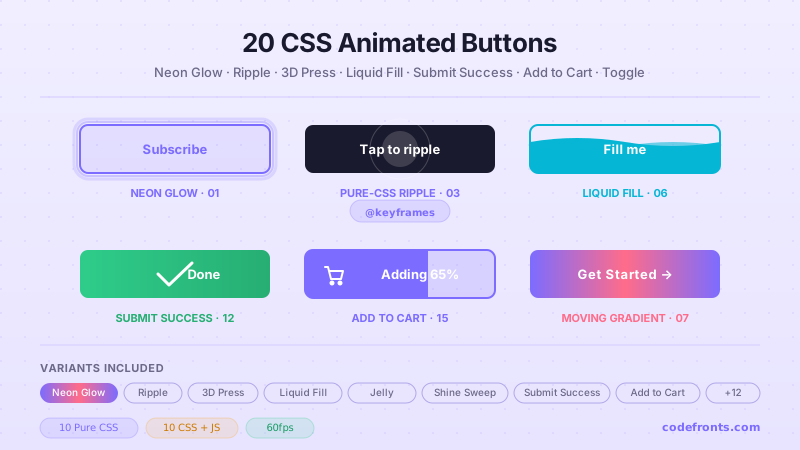
20 Tailwind CSS animated buttons for form submit and add-to-cart flows, download progress and loading state machines, gradient and neon CTAs, hamburger and toggle switches, and social share rows — spanning ripple and shine sweeps, liquid fills, 3D keycap presses, jelly bounces, text flips, checkmark draws, and cursor-aware reveals. Scoped under .tab-NN for no-collision pasting, prefers-reduced-motion guarded, framework-agnostic.
Building a whole Tailwind app, not just this component?
You just browsed 20 Tailwind animated buttons. Untitled UI Pro unlocks 5,000+ components and sections and 250+ page examples for React, styled with Tailwind CSS v4. One licence is a one-time $349 with lifetime updates; teams start at $999.
A neon-lit CTA with a breathing glow halo, ported to a single class list. The port's win is --animate-tab01-pulse: the whole animation shorthand is declared once as a token, so the markup says animate-tab01-pulse and the hover override says hover:[animation-play-state:paused] — the trigger reads where the button is, not three rules away.
Four directional fills that sweep across the button face — left, right, top, bottom. The port collapses eight CSS rules (four resting transforms, four hover transforms) into four class lists, each stating its own direction: before:-translate-x-full hover:before:translate-x-0.
A Material-style ripple that fires on press with no JavaScript at all. The port's interesting line is active:after:animate-tab03-ripple — two variants stacked, reading "while pressed, run the ripple on my own after-layer", which is the entire behaviour in one class.
A border that draws itself around the perimeter on hover, two pseudo-elements sharing the work. The port's real content is timing: before:delay-0, before:transition-[width,height] and a staggered after:delay-[400ms] put the whole four-stage cascade in the class list instead of a comment.
A keycap that physically sinks into its own platform. Two properties do all the work, and as utilities the resting and pressed states sit side by side: shadow-[0_6px_0_…] becomes active:shadow-[0_2px_0_…] while the face drops active:translate-y-1.
Liquid rises to fill the button on hover, its surface undulating while it sits there. Two motions, two mechanisms: a transition for the rise and a keyframe for the wave — and the port makes the split explicit, since the rise is a utility pair and the wave is hover:before:animate-tab06-wave.
Newsletter
Enjoying these demos? Get new ones by email.
A short email when a new collection ships. Unsubscribe any time.
An infinite colour-cycling CTA: one oversized gradient, one background-position loop. The port is nearly a transcription — bg-[linear-gradient(...)] bg-[size:300%_300%] animate-tab07-shift — and the notable part is how the reduced-motion fallback becomes a one-utility override instead of a duplicated rule.
A narrow band of light crosses the button face once per hover. The port puts the streak's whole identity — gradient, tilt, starting position — on the element as before: utilities, and its motion in one hover:before:animate-tab08-shine.
Squash, stretch, and a settling wobble — seven keyframe steps of jelly physics. Nothing about the timeline can become a utility, and that is the point: the port keeps the keyframe verbatim and reduces the CSS to a single trigger, hover:animate-tab09-jelly.
The label pivots away on a horizontal axis and a second message pivots in behind it. The port's structural gain is group: the button declares it once and both panels read group-hover:, so the two halves of the flip are described on the elements that actually rotate.
A landing-page CTA with two radar rings pinging outward and a particle burst on click. The rings are pure utilities on one wrapper's two pseudo-elements; the JS does nothing but stamp a vector onto each particle and let the animation system handle every frame.
A submit button that collapses into a circle and draws a checkmark. The port replaces a class toggle with data-state, so the markup reads data-[state=success]:w-12 and the impossible state ("success and idle at once") stops existing.
Click and the arrow bounces, a progress bar sweeps the button's bottom edge, and the label resolves to "Downloaded!". Three states, one data-state attribute, and a progress bar that is a single after: layer scaling on the compositor.
Three bars become an ×. The port's win is that the animation now keys off the accessibility attribute the toggle already has to set: group-aria-expanded:rotate-45 reads aria-expanded directly, so the icon state and the announced state cannot drift.
Newsletter
Enjoying these demos? Get new ones by email.
A short email when a new collection ships. Unsubscribe any time.
A dot leaps from the cursor into the cart badge, the count ticks, and the button flashes confirmation. JS measures the flight vector once per click and hands it to CSS as two custom properties — the arc itself is a keyframe.
A row of 44×44 share buttons that adopt their platform's brand colour on hover, each with a CSS-only tooltip, plus a copy-link button that confirms in place. The tooltip is still content: attr(...) — there is no HTML for it at all.
Three iOS-style switches where the visuals are entirely zero-JS: peer-checked: moves the knob and tints the track, has-checked: highlights the whole row, and the on/off label swaps with peer-checked:hidden. The only JavaScript left announces the change.
Idle → loading → success → idle, with a spinner built from a single after: ring. The port replaces measured inline widths with min-w-40, so the button no longer needs JavaScript to know how wide it is.
Slider controls where the arrow slides out as a duplicate slides in behind it. The port swaps a fake .is-disabled class for the real disabled attribute, so disabled: handles the styling and the browser handles the blocking.
A ghost button whose fill grows from wherever the cursor entered and shrinks back toward wherever it left. Demo 03 showed why a pure-CSS ripple can't do this: CSS has no access to pointer coordinates. Here JS supplies two numbers and nothing else.
FAQ
Frequently asked questions
How do I define the custom keyframe animations these buttons use in Tailwind?
Tailwind ships no neon-pulse or jelly-squash animation, so each port registers its own in the theme layer. In v4 you add a keyframes block plus an --animate-* token inside @theme, then play it with a utility like animate-[--animate-halo] or a named animate-halo. The neon glow (Demo 01) and the seven-step jelly bounce (Demo 09) both work this way — the whole squash timeline lives in one @keyframes and the utility just runs it. In v3 you instead extend theme.extend.keyframes and theme.extend.animation in the config file. The payoff the ports keep pointing at is that once the token exists, duration, easing and iteration all stay as utilities on the element, so the entire animation is still readable in the class list rather than hidden in a stylesheet.
How does the ripple button work with no JavaScript?
Demo 03 puts the whole effect in one pseudo-element. A before: layer sits centred at zero size with before:scale-0 and a radial background; the active: variant flips it to active:before:scale-150 so pressing the button expands the circle from the middle, then it fades back. Because it keys off :active — the press state the browser already tracks — there is no click handler, no appended node and nothing to clean up afterward. The trade-off is that a true Material ripple originates at the pointer coordinate, while this one always grows from the button centre, since CSS cannot read where you clicked without JS. For most CTAs that difference is invisible, and in return you get a ripple that survives being copied into any framework untouched, with no lifecycle code to port alongside it.
Why isn't my peer-checked toggle knob moving?
Demo 17 drives three switches with zero JavaScript, and the usual bug is variant-target confusion. peer-checked: only styles an element that comes after the checked input in the same parent, and only when that input carries the bare peer class — put peer on the wrong node, or the knob before the input, and nothing moves. The track uses peer-checked:bg-* while the knob uses peer-checked:translate-x-full. The has-checked: variant instead reads state from a descendant, so the styled element must be the parent of the input, not a sibling — a common reason a converted demo breaks. Keep the real checkbox in the DOM with sr-only rather than hidden: a display-none input drops out of the tab order and the switch stops being keyboard-operable, which fails the control silently.
How does the hamburger button animate from bars to an X accessibly?
Demo 14 animates the three bars into an × by keying the transforms off aria-expanded instead of a cosmetic .is-open class. Tailwind exposes attribute state through the aria-expanded: variant, so aria-expanded:rotate-45 on the top bar, aria-expanded:-rotate-45 on the bottom, and aria-expanded:opacity-0 on the middle bar produce the X. The single line of JS just flips the attribute's value on the <button>. This is the accessible pattern: the same attribute a screen reader announces — collapsed versus expanded — is the one the animation reads, so the visuals and the semantics can never drift apart. Give the control an aria-label since it has no visible text, and set aria-expanded on the trigger itself, not on the menu it controls, or assistive tech announces the wrong element's state.
How does the moving gradient CTA loop without a visible seam?
Demo 07 paints one gradient far wider than the button — think bg-[length:200%_auto] — then animates background-position from one end to the other in an infinite loop. The seam is avoided by making the gradient's first and last colour stops identical, so the wrap-around is continuous and reads as endless rather than snapping. Animating background-position is relatively cheap because it does not reflow geometry, but it is not compositor-only the way transform is, so on a page carrying dozens of these you can notice paint cost and should measure. Keep the motion on the background rather than on a huge animated box-shadow, and wrap the utility in motion-reduce:animate-none so the colour churn stops for anyone who has asked the system for less motion. That one variant is the difference between a polished CTA and a distracting one.
Why does my 3D text-flip button look flat instead of rotating in space?
Demos 10 and 05 need a 3D context the flat utilities do not create by default. The rotation only reads as depth if the parent establishes perspective — in v4 that is the perspective-* utilities or an arbitrary [perspective:600px], applied to the wrapper and not to the rotating face. The two label faces then need [transform-style:preserve-3d] on their shared parent and backface-hidden on each, so the reversed side does not bleed through mid-flip. The incoming message is pre-rotated with [transform:rotateX(90deg)] and swings to zero on hover as the front face pivots away. Forget the perspective and every rotateX collapses into a vertical squash — the flat look you are describing. The keycap press in Demo 05 is unrelated here: it is just a translate-y plus a shrinking shadow and needs no perspective at all.
When should I avoid these animated buttons, and how do I respect reduced-motion?
Reach for the plain version whenever the button is doing real work under load. A submit or loading state machine (Demos 12 and 18) must never signal success through motion alone — pair the checkmark draw or spinner with a text change and an aria-live region, because a drawn stroke announces nothing to a screen reader and the user is left guessing whether the action completed. Skip the infinite loops — neon pulse, moving gradient, beacon rings (Demo 11) — in dense dashboards or long lists, where a dozen always-running animations tax paint and pull attention off the content. And every continuous or hover-triggered effect here should carry motion-reduce:animate-none, plus a motion-reduce:transform-none where a transform is the whole point, so the roughly one user in twenty who sets the reduced-motion preference gets a still, usable control instead of vestibular churn.
Why is my slide-fill or shine-sweep effect spilling outside the button's rounded corners?
The directional fills (Demo 02), liquid rise (06), gloss streak (08) and cursor-aware reveal (20) all animate a pseudo-element that begins larger than or offset from the button. Two utilities keep it contained: relative on the button so the absolutely-positioned before: or after: layer anchors to it, and overflow-hidden so the part of that layer outside the box — and outside the rounded corners — is clipped. Miss overflow-hidden and the wave or streak bleeds past the radius into a hard rectangle. The other half of the bug is stacking order: give the moving layer z-0 or a negative index and the label relative z-10, otherwise the fill paints over the text and the button looks blank mid-hover. The ghost button additionally sets its reveal origin from a CSS variable a pointer handler updates — the single line of JS it actually needs.