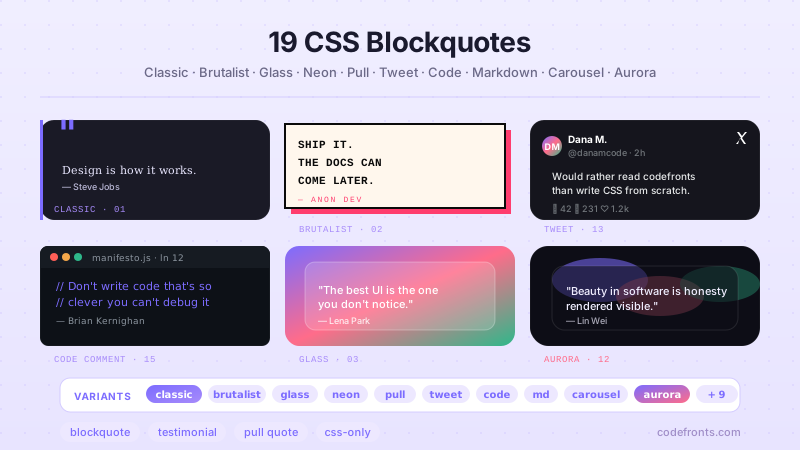
25 Tailwind CSS blockquotes for editorial pull quotes, SaaS testimonials, docs callouts, keynote banners, and social embeds — spanning left-border and vertical-rail rules, gradient and neon borders, glassmorphism and aurora backgrounds, brutalist and newspaper layouts, highlight marks, a scroll-snap slider, and expandable clamps. Scoped under .tbq-NN for no-collision pasting, prefers-reduced-motion guarded, framework-agnostic.
Building a whole Tailwind app, not just this component?
You just browsed 25 Tailwind blockquotes. Untitled UI Pro unlocks 5,000+ components and sections and 250+ page examples for React, styled with Tailwind CSS v4. One licence is a one-time $349 with lifetime updates; teams start at $999.
The most-searched quote treatment, ported whole into utilities: an editorial serif quote crowned by a giant opening mark drawn with before:content-['“']. The mark is generated (invisible to screen readers), tinted with the opacity modifier text-tbq01-acc/40 — Tailwind's spelling of color-mix() — and cropped with before:h-[0.5em] so the first line sits inside its curl.
The canonical Tailwind testimonial — logo, quote, avatar, name and role on a ringed dark card — now in its native language. The CSS original emulatedring-1 ring-white/10 with box-shadow; here the ring is the ring, the avatar gets ring-offset, and the footer re-stacks with v4's built-in @container / @max-[26rem]: variants instead of a hand-written container query.
Docs-style Note / Tip / Warning admonitions. The CSS original drove all three from one --tone token and [data-kind] selectors; the Tailwind port makes each variant an explicit class list (border-l-tbq03-tip bg-tbq03-tip/8) — more characters, but every variant is greppable and a reviewer can see exactly what "warning" looks like without reading a stylesheet.
A full-bleed keynote quote banner: display serif at clamp(40px,3vw+24px,76px), a gradient-clipped closing phrase, and a rule–name–rule attribution line built from a three-column grid. On phones the rules drop away with max-sm: and the attribution stacks, so the name never wraps into a two-line orphan between hairlines.
The quiet blog quote: a 2px logical rule (border-s-2, so it flips in RTL) and a serif italic line. The Tailwind port keeps the hover accent but fixes how it moves — instead of animating padding (which reflowed every line of the quote), an accent rail draws down over the grey rule with before:scale-y-0 hover:before:scale-y-100, compositor-only.
A quote card whose border is a rotating conic gradient, drawn with the two-background padding-box / border-box trick and animated by registering the angle with @property. The Tailwind port keeps the keyframes as an --animate-* theme token and adds a blurred glow twin of the border behind the card that brightens on hover.
Newsletter
Enjoying these demos? Get new ones by email.
A short email when a new collection ships. Unsubscribe any time.
The ten-line blockquote everyone types from memory — left rule, soft wash, serif italic — but with language-aware quotation marks: [quotes:'“'_'”'_'‘'_'’'] plus before:content-[open-quote] means the nested <q> automatically gets single marks. No hard-coded characters in the text anywhere.
Neo-brutalist quote: 3px ink borders, a hard shadow-[8px_8px_0_…], zero radius and a tilted sticker for attribution, on ruled-paper background. Hover presses the card halfway into its shadow; active: presses it flat. The port drops the original's tabindex="0" on a non-interactive card and gives the sticker a group-hover:rotate-1 wobble instead.
Frosted-glass quote over drifting colour orbs. The port turns the original's @supports block into supports-[backdrop-filter:blur(1px)]: variants — so the opaque fallback and the frosted version are both visible in one class list — and adds a specular top-edge highlight that sells the glass.
A neon sign: a 4-layer cyan box-shadow falloff (tight core → wide bloom → inner cast), matching text-shadow on the quote, a pink pill for the author, and an occasional flicker. The port sets the quote in Tilt Neon — a typeface drawn as bent tubing — and lets hover "turn the power up" with a brighter shadow stack.
Magazine pull quote floated into the running text with float-end and [shape-outside:margin-box], collapsing to a full-width block below 520px of article width via @max-[520px]:float-none. The port adds a drop cap with first-letter: utilities and hides the duplicated pull text from screen readers so it isn't read twice.
Two speech-bubble tails side by side: the classic zero-size border triangle (after:border-[11px] after:border-r-tbq12-bubble) and a clip-path polygon that can carry the bubble's gradient. The port adds what every chat UI needs next — messages that slide in with the starting: variant (@starting-style) and a typing indicator.
A 14px gradient rail in its own grid column, carrying vertical label text ([writing-mode:vertical-rl] rotate-180), beside a large quote with a gradient-clipped author name. The port makes the rail draw in on load with starting:scale-y-0 and fixes the rail label, which was near-invisible dark text on the orange-to-magenta gradient.
Conversion-grade testimonial card: star rating, verified badge, quote, avatar, a headline metric, and a case-study link. The port turns the card from a fake-focusable tabindex="0" figure into a real stretched-link card — the whole surface clicks through, and has-[a:focus-visible]: puts the focus ring on the card, not the tiny link.
Newsletter
Enjoying these demos? Get new ones by email.
A short email when a new collection ships. Unsubscribe any time.
Annotated quote with two highlighter styles on real <mark> elements: a rounded wash that repeats its padding on every wrapped line (box-decoration-clone) and a slanted-edge marker swipe. The port fixes two bugs in the original's swipe — its z-index:-1 pseudo-element slid behind the stage background, and as one absolute box it smeared across line breaks — by redrawing it as a cloned angled gradient, and makes the first highlight draw across on load.
Three grades of marker underline in one sentence: a thick decoration-[0.22em] text-decoration, a gradient band that grows across the words (animate-tbq16-draw), and a hand-drawn SVG stroke that draws itself in. The port rewrites the SVG to pathLength="1" so the dash animation no longer depends on a hard-coded path length.
A floating quote card on a five-layer, hue-tinted shadow ramp, with an elevation ruler showing e1–e3. The port promotes every shadow to a --shadow-tbq17-* theme token, so shadow-tbq17-rest and shadow-tbq17-e3 are real utilities, and keeps the performant hover: the heavier shadow lives on an after: layer whose opacity animates.
Three blurred radial blobs drift and screen-blend while a wrapper slowly rotates hue, behind a frosted quote panel. The port adds a static star field — eight 1px radial gradients in one bg-[…] — so the aurora reads as sky rather than lava lamp, and sets the quote in Instrument Serif.
A lightweight social-post embed: a styled <blockquote cite> instead of a 100KB third-party iframe. The port adds a working, accessible like toggle — aria-pressed drives the pink fill through aria-pressed: and group-aria-pressed/act: variants — and extends the relative timestamp to months.
A broadsheet front page: blackletter masthead, headline, standfirst, three justified columns with hairline rules, a drop cap, and a crossing quote that spans all columns mid-flow with [column-span:all]. Columns step 3 → 2 → 1 with @max-[680px]:columns-2 and @max-[460px]:columns-1 on the paper's own width.
A quote dressed as a JSDoc comment inside an editor window — tab bar, CSS-counter line numbers, an active-line highlight, syntax colours and a blinking caret. The port styles all nine lines from the parent with arbitrary variants ([&>span]:before:content-[counter(tbq21-line)]) and adds whitespace-pre so the comment's asterisks finally line up like real code.
Styles bare Markdown output — nested blockquotes, attribution and a GitHub-style Note alert — with zero classes inside the rendered content. Every rule lives on the article wrapper as an arbitrary descendant variant ([&_blockquote]:border-s-3), and nesting depth re-points one custom property: [&_blockquote_blockquote]:[--q:var(--color-tbq22-q2)].
Newsletter
Enjoying these demos? Get new ones by email.
A short email when a new collection ships. Unsubscribe any time.
A testimonial carousel built on native scroll-snap (snap-x snap-mandatory), so swipe and trackpad physics are the browser's own. The port adds what the accessibility audit asks for — a visible pause/play toggle (WCAG 2.2.2), prev/next buttons, 44px dots — and fixes a drift bug where the index math ignored the gap between slides.
A long quote clamped to three lines with a fade, expanding on a native <details> toggle — no JavaScript. Utilities handle the clamp release (group-has-[[open]]/card:line-clamp-none), the label swap and the chevron; a six-line CSS block adds the smooth height animation via ::details-content + interpolate-size, which have no Tailwind variant.
A quote card with a copy button that fades in on hover or focus, flips to a green “Copied” state, and announces success through a polite live region. The port drives the copied state with a data-copied attribute and v4's bare data-copied: variant, keeps the button always visible on touch (pointer-coarse:), and adds an execCommand fallback for iframes where the Clipboard API is blocked.
FAQ
Frequently asked questions
How do I add giant decorative quotation marks to a Tailwind blockquote without an extra element?
Put the mark in a pseudo-element so it stays out of the accessibility tree. In Tailwind that is an arbitrary before: variant: before:content-['“'] plus before:absolute before:-top-6 before:text-8xl and a muted colour like before:text-slate-200. Make the quote wrapper relative so the absolutely-positioned glyph anchors to it, and give the text a z-10 or padding so the mark sits behind rather than over the words. Demo 01 does exactly this. The common bug is the curly entity: writing a straight " inside content renders a typewriter quote, and forgetting to escape it in JSX breaks the class string. Because the glyph lives in content, a screen reader never announces it, which is correct — it is decoration, and the real <blockquote> text is what gets read.
How does the gradient border blockquote animate without a wrapper div for the border?
It uses the two-background padding-box / border-box trick, seen in demo 06. You set a transparent border, then paint two layered backgrounds: the solid card colour clipped to padding-box and a conic or linear gradient clipped to border-box. In Tailwind that is arbitrary values like [background:linear-gradient(#0b1020,#0b1020)_padding-box,conic-gradient(from_var(--a),#22d3ee,#a855f7)_border-box] with border-2 border-transparent. The rotation comes from animating a registered @property angle, not the gradient itself, so it composites on the GPU. The usual mistake is omitting border-transparent — the border then paints the element's own colour and hides the gradient. Keep the border width small; a thick transparent border eats into the padding box and clips your text.
What is the accessible way to build the Note / Tip / Warning callout boxes?
Demo 03 drives all three tones from one token, but colour alone must never carry the meaning — that fails contrast and colour-blind users. Pair each tone with a text label and an icon that has a real accessible name. Keep the label visible ("Note", "Warning") rather than relying on the border hue, and if the icon is an inline <svg>, give it aria-hidden or a <title>. For a genuine alert use role of note for advisory content; reserve the alert role for content that appears dynamically and must interrupt, because it is announced immediately. The frequent bug is switching only border-s-4 colour with a data attribute and calling it done — a monochrome reader then sees three identical grey boxes. Bind the tone to text, border, background and the label together.
Why does my left-border blockquote break in right-to-left languages, and how do I fix it?
A physical border-l-2 pins the rule to the visual left even when the document direction flips, so an Arabic or Hebrew quote gets its accent on the wrong side. Demos 05 and 07 use logical properties instead: border-s-2 maps to the inline-start edge, so it sits left in LTR and automatically moves to the right in RTL. Do the same for spacing — use ps-4 and ms-4 rather than pl-4 / ml-4. Tailwind ships these s/e utilities out of the box, so the fix is a find-and-replace, not custom CSS. The subtle trap: text-left is also physical — reach for text-start so the quote and its attribution align to the reading edge. Set dir on an ancestor and the whole card mirrors correctly with no media query.
How do I float a pull quote into article text so the paragraphs wrap around it?
Demo 11 floats the quote with float-end (the logical version of float-right) and gives it a width and inline margin so body copy reflows beside it. To soften the wrap, add an arbitrary [shape-outside:margin-box] — or a circle/polygon — so lines hug the quote's shape rather than its bounding box. Two things bite people. First, floats need surrounding block text to wrap around; drop a floated quote into a flex or grid child and nothing wraps, because the float is taken out of a formatting context that no longer applies. Second, on narrow screens a floated quote squeezes the body into an unreadable column — gate the float behind md:float-end and let it stack full-width on mobile. Keep it as a real <blockquote> with a <cite> so it is still a quote, not just a decorative aside.
How does the testimonial slider work without a carousel library, and is it keyboard accessible?
Demo 23 is native CSS scroll-snap: a horizontally scrolling flex track with snap-x snap-mandatory and each card set to snap-start shrink-0 basis-full. Swipe, trackpad and the scrollbar all move it with zero JavaScript, and momentum feels native because the browser owns it. For keyboard and screen-reader users, snap alone is not enough — a keyboard user needs to reach each slide. Make the scroll container focusable or give each card a tabbable control, and ensure focus moving to an off-screen card scrolls it into view (browsers do this for real focusable elements). Add scroll-smooth for animated jumps. The classic bug is putting overflow-hidden on the track to hide the scrollbar — that also kills scrolling entirely; use overflow-x-auto and hide the bar with [scrollbar-width:none] instead.
When should I not use the glassmorphism or aurora blockquote?
Demos 09 and 18 lean on backdrop-blur and drifting blurred blobs, and both are expensive. Skip them when the quote sits over plain or busy-text backgrounds — frosted glass only reads as glass over colour and imagery; over white it is just a faint grey box with a contrast problem. backdrop-filter also forces a new stacking context and repaints on scroll, so a page with several of these on mobile will jank; use one, not a grid of twelve. Watch legibility: translucent text on a shifting aurora can dip below the contrast floor, so keep the quote text solid and high-contrast even when the panel is see-through. And always respect motion preferences — the drift animation should be wrapped so it stops under motion-reduce: variants. For a documentation site or an email, reach for the plain left-border demo instead; glass buys atmosphere, not clarity.
How do I make the copy-to-clipboard quote button announce success to screen readers?
Demo 25 fades the button in on hover or focus — always include the focus-visible: variant, or keyboard users can never reach a control that only appears on hover. On click it writes the quote text with the Clipboard API and flips to a green "Copied" state. The visual swap is not enough on its own: a screen reader will not notice the label change. Put the status text in an element with a polite live region so the assistive tech announces "Copied" when it updates, and keep the button's accessible name stable (use aria-label of "Copy quote") so it does not read as a brand-new control each time. Reset the label after a couple of seconds with a timer. Two gotchas: the Clipboard write needs a user gesture, so trigger it from the click, not an effect; and it needs a secure context, so it silently fails over plain HTTP during local testing.