Building a whole Tailwind app, not just this component?
You just browsed 20 Tailwind clay designs. Untitled UI Pro unlocks 5,000+ components and sections and 250+ page examples for React, styled with Tailwind CSS v4. One licence is a one-time $349 with lifetime updates; teams start at $999.
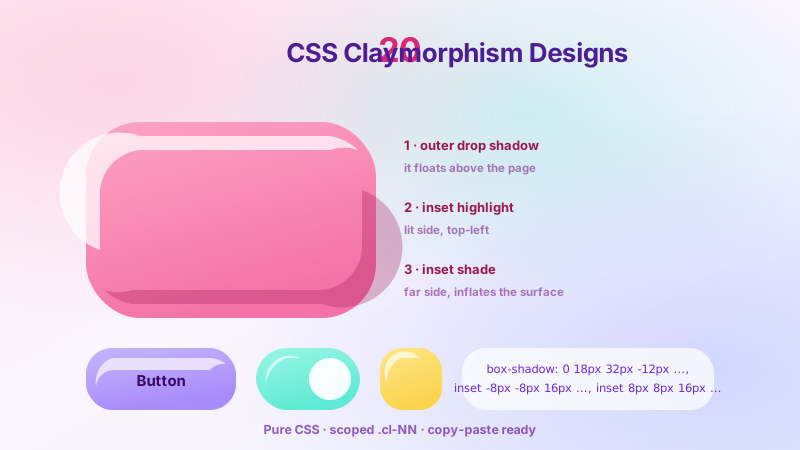
The reference build for the whole trend, ported to utilities: one clay object, four radio steps, and the shadow assembled one layer at a time — flat fill, outer drop, inset far-side shade, inset lit-side highlight. Each step is a --shadow-tcl01-s* theme token with the same layer count, so group-has-[#tcl-01-s3:checked]/lab:shadow-tcl01-s3 animates instead of snapping. A new layer meter under the object counts the layers as they land.
Isolate the two inset layers and the material becomes obvious: highlight alone looks inflated, shade alone looks hollow, together they look like clay. The comparison balls use v4's dedicated inset-shadow-* utilities, and the hero sphere orbits its light with two @property-registered lengths — a genuinely animatable inset shadow. New: a pause button, because an infinite animation needs one.
Radius is what makes clay clay. This is the working scale — 16px to a hero 44px — minted as --radius-tcl03-* tokens so they become rounded-tcl03-lg utilities, plus the elliptical slash-syntax blob and corner-shape: squircle behind supports-[corner-shape:squircle]:. New: the flat→puffy ruler now tracks whichever shape you hover.
The comparison people actually search for: two identical cards that differ only in shadow strategy — extruded-from-the-page neumorphism and lifted-object claymorphism — with a switch that re-skins the neumorphic card in clay tokens. The port fixes the original's half-swap (the button kept its 14px corner) and adds a live contrast verdict to each card.
The hybrid dominating 2026 product pages: clay geometry and clay shadow layering, but a frosted-glass fill. backdrop-blur-[26px] backdrop-saturate-170 lets the photo through while the inset sheen keeps the puffy silhouette. Fallbacks are variants — not-supports-[backdrop-filter:blur(1px)]: and a prefers-reduced-transparency custom variant — and the status dot now has a label.
A whole dashboard lit by one pair of numbers. Pick a light direction and every card, bar, avatar and button re-lights together, because each shadow is a calc() of two inherited, @property-registered numbers. In Tailwind the formula becomes one custom utility — @utility tcl06-lit — and the direction is four has-[#…:checked]:[--tcl06-lx:1] classes on the root. New: a sun marker orbits the panel so you can see where the light is.
Newsletter
Enjoying these demos? Get new ones by email.
A short email when a new collection ships. Unsubscribe any time.
Four elevation tiers — inset well, resting, raised, floating — driven by one integer. The port turns that integer into a functional utility: @utility tcl07-tier-* { --tcl07-elev: --value(integer) } mints tcl07-tier-1…tcl07-tier-4, so hover:tcl07-tier-3 promotes a card one tier. New: each tile shows a live elevation gauge, and the tiles are real focusable buttons.
The CSS collection's version of this demo could only mirror Tailwind's output. This one runs it. Three live buttons are built three ways — an @theme shadow token, a one-class @utility clay, and a raw arbitrary value — beside tabbed, copyable source for each. The tabs are native radios; the Copy button is the only script.
Six clay buttons with a real physical press: on active: the object squashes (scale-y-93), sinks 4px and swaps to an inverted-inset shadow, then springs back on an overshooting curve. The port adds a latching toggle — a Follow pill that stays pressed in — and fixes the disabled button's redundant aria-disabled.
A complete clay form-control set: a switch whose track is an inset well and whose knob is a puffy pebble, checkboxes with a drawn-on tick (after:rotate-45 after:border-r-3 after:border-b-3), and a segmented radio group with a sliding clay thumb. Every control is a native input inside its own <label>, so has-checked: replaces sibling-selector plumbing. New: switches carry role="switch" and a check glyph in the knob.
Inputs are where clay inverts: a field you type into is a well, not a lifted object. An inset search bar opens a suggestion tray on focus (group-focus-within/search:grid with a starting: entry), floating labels ride peer-focus:, errors wait for user-invalid:, and the note grows with field-sizing: content. New: suggestions are keyboard-reachable buttons, and a valid email earns a check.
A full badge and tag system at clay scale: hue-driven status badges, count bubbles on clay avatars, removable filter tags, and a size scale from micro to hero. Two custom utilities carry the recipe — tcl12-badge reads one [--tcl12-h:150] hue, tcl12-pill scales every shadow length from one [--tcl12-u:1.25] unit. New: removed tags leave the tab order, and clearing them all shows an empty state.
The workhorse: a clay content card with a real photo in an inset well, concentric radii, a clay avatar row and a one-tier hover lift. It switches from stacked to side-by-side at @min-[430px]: of its container. The port fixes a real bug — the CSS original queried the card from itself, which never matches — and adds a width switch so you can watch the layout flip, plus a working Save toggle.
A tier-4 clay dialog on the native popover API — no focus-trap library, no script. The browser owns the top layer, light dismiss, Escape and focus return; Tailwind owns the rest: open:grid, starting:open:scale-94 for the entry, transition-discrete for the exit, and backdrop:backdrop-blur-[7px] for the scrim. New: a labelled close button and drawn check glyphs in the checklist.
Newsletter
Enjoying these demos? Get new ones by email.
A short email when a new collection ships. Unsubscribe any time.
Three plans where hierarchy comes from depth, not a coloured border: the popular tier floats a full elevation tier above its neighbours, is physically larger, and wears a clay ribbon. The billing switch is a checkbox read by group-has-[#tcl-15-billing:checked]/demo:, so prices change with no script. New: yearly shows the monthly equivalent with a "billed $182 yearly" line — the pattern buyers compare on.
A floating clay dock with five destinations, a sliding puffy indicator and the two things production tab bars must get right: pb-[calc(12px+env(safe-area-inset-bottom))] to clear the iPhone home bar, and 56px targets. The pill reads the checked radio through group-has-[#tcl-16-t3:checked]/bar:translate-x-[200%]. New: the screen title follows the active tab, and the incorrect role="tablist" is gone.
Nine clay app tiles on a squircle grid, each colour generated from one [--tcl17-h:28] hue, with a real 3D tilt (perspective-[900px] + hover:rotate-x-13) and a staggered pop-in whose delay is calc(var(--tcl17-i) * 60ms). New: an Edit mode switch makes the grid jiggle like a phone launcher — a second keyframe swapped in by group-has-checked:.
Four semantic clay toasts — success, info, warning, error — each dismissible in pure CSS, plus a chat-style bubble with an asymmetric tail. The toast is a grid-rows-[1fr] that collapses to has-checked:grid-rows-[0fr], so the stack closes the gap smoothly. New: a Clear all control and an "all caught up" empty state, and 44px dismiss targets (were 34px).
Dark mode is where naive clay dies: black shadows on a dark page vanish and the object flattens. Every colour token here is a light-dark() pair in @theme, so a single has-[#tcl-19-dark:checked]:[color-scheme:dark] on the root re-themes all three shadow layers at once — longer near-black drop, halved inset shade, and a 1px rim that becomes the primary edge. New: a Light / Dark / System control.
Measure it, don't guess. Clay tiles animate under a live FPS meter in two modes: the naive one animates box-shadow directly; the optimized one pre-renders the lifted shadow on an after: layer and cross-fades its opacity while translate/scale do the motion. Mode is a data-mode attribute read by group-data-[mode=fast]/panel:. New: a 24 / 96 tile stress switch and a running average, so the gap shows on fast machines too.
FAQ
Frequently asked questions
What is the box-shadow recipe that makes claymorphism look like clay?
Clay is three shadow layers stacked in one box-shadow declaration, shown in Demo 01. First a large soft outer drop shadow that lifts the object off the page (something like 0 20px 40px rgba(0,0,0,.14)). Second an inset highlight in the top-left — a light, low-opacity inset shadow that reads as a rounded lip catching the light. Third an inset shade in the bottom-right that darkens the far edge so the surface curves away. Demo 02 isolates the two inset layers to prove the point: highlight alone makes the object look inflated, shade alone makes it look scooped-out, and only both together read as a solid puffy solid. In Tailwind you build this with a stacked arbitrary shadow-[...] value or a custom --tw-shadow token, keeping all three layers in a single utility so they compose as one paint pass.
What border-radius should I use so the shapes look puffy instead of just rounded?
Radius is the other half of the material — Demo 03 mints a working scale from 16px up to a hero 44px as CSS custom properties, then references them through Tailwind arbitrary values like rounded-[--r-lg]. The rule that stops clay looking like ordinary rounded cards is concentric radii: a child sitting inside a padded parent needs a smaller radius than the parent, matched so the inner and outer curves stay parallel. Demo 13 does this with a photo in an inset well — outer card radius minus the padding equals the inner well radius. For genuinely pillowy shapes, push toward the squircle end (Demo 17's app tiles): a large radius on a near-square box so the corners are almost superelliptical. Undersized radius reads as flat; oversized on a wide box collapses to a stadium/pill, which is what you actually want for badges and toggles in Demos 10 and 12.
What is the difference between claymorphism and neumorphism in these demos?
Demo 04 puts two identical cards side by side that differ only in shadow strategy. Neumorphism is extruded: the object is the same colour as its background and appears pressed out of a single continuous surface, using a matched light/dark shadow pair with no real outer drop shadow. It has almost no contrast, which is exactly why it fails accessibility. Claymorphism is lifted: the object has its own fill colour, a genuine large outer drop shadow that separates it from the page, plus the inset highlight and shade for the puffy surface. So clay keeps figure-ground contrast that neumorphism throws away. Practically: if you strip the outer drop shadow and match the object colour to the page, you have drifted into neumorphism. Keep the object a distinct colour and keep the outer shadow, and you stay in clay — that is the single decision the comparison demo is built to show.
Why do my clay shadows disappear in dark mode and how do I fix it?
Naive clay dies in dark mode because black shadows on a dark page have nothing to darken — the object flattens, as Demo 19 shows. The fix is recalibration, not colour inversion. On a dark surface the outer drop shadow must go deeper and higher-opacity to still register, while the inset highlight becomes the load-bearing layer: a subtle light inset along the top edge is what now communicates the raised surface, because the shade layer has little room to work. Demo 19 drives this with the light-dark() CSS function so a single colour token resolves differently per scheme, meaning you declare each shadow colour once instead of maintaining two shadow stacks. Pair it with Tailwind's dark: variant only where a token genuinely needs a different value. The common bug is reusing the light-mode rgba(0,0,0,...) shadows verbatim — they vanish; you must lighten the fill and lift the highlight.
How do I build a clay button that physically presses down when clicked?
Demo 09 gives six clay buttons a real squish on the active: variant. Two things happen together on press: the object squashes vertically with something like active:scale-y-93 (and a slight scale-x bulge to fake volume conservation), and the shadow stack collapses — the large outer drop shadow shrinks and the inset shade deepens, so the button reads as pushed into the surface rather than just tinted. Animate transform and let the shadow change ride the same short transition. Keep the duration tight (roughly 80–120ms) or the press feels mushy. Do the squish on transform, never on width/height, so it stays on the compositor. Add focus-visible: ring utilities so keyboard users get the same affordance, and respect reduced motion by dropping the scale for users who ask for it — the colour and shadow change alone still signal the press.
Why should clay inputs look sunken instead of raised?
Because clay maps depth to interaction, and a field you type into is a hole, not a hill. Demos 10 and 11 invert the material for controls: a text field, search bar and the track of a toggle switch are all rendered as inset wells — the highlight/shade order flips so the light catches the bottom edge and the top edge is shaded, reading as a scooped recess. The puffy, raised treatment is reserved for things you press out: buttons, and the knob of the switch (Demo 10's knob is a lifted pebble sliding along an inset track). Getting this backwards is the most common clay-form mistake — a raised, puffy text field looks like a button and users do not know it is editable. So: containers and actionable objects lift; anything that receives input or shows a value sinks. The floating-label input in Demo 11 keeps the recess while the label rides up on focus, so the well never loses its inset identity.
Is claymorphism accessible, and what do I have to watch for?
Clay is more accessible than neumorphism because it keeps figure-ground contrast — the object has its own fill and a real outer shadow, so it never blends into the page the way extruded neumorphism does. But the shadows are decorative and carry no semantic weight, so accessibility rides entirely on the underlying markup. Use real elements: a real <button> for pressable clay, a real <input> with a paired <label> for the inset fields in Demos 10 and 11, and a real <dialog> or the native popover attribute for the modal in Demo 14 so focus and Escape are browser-owned. Ensure text-on-fill contrast still meets 4.5:1 — the soft pastel clay palettes drift toward low contrast. Add focus-visible rings, because a puffy surface does not communicate focus on its own. And honour prefers-reduced-motion on the press and slide animations in Demos 09 and 16.
When should I not use claymorphism, and what is the performance cost?
Skip clay when you have dense data or many simultaneous surfaces. Demo 20 puts clay tiles under a live FPS meter and shows why: animating box-shadow forces the browser to repaint the blurred shadow every frame, which tanks frame rate once several objects animate at once — the multi-layer clay shadow is expensive precisely because it is three blurs. The fix is to never animate the shadow itself; animate transform (translate/scale) instead, which stays on the GPU compositor, and reserve shadow changes for discrete state, not continuous motion. Beyond performance, avoid clay for information-dense dashboards, tables and long forms where the soft pastel palette and heavy padding waste space and lower contrast. It shines for hero cards, pricing tiers (Demo 15), app-icon grids (Demo 17) and playful product marketing — anywhere a small number of large, tactile objects carry the page. Use it decoratively, not as the chrome for everything.